This section is mostly to guide customers through paying as a Guest on Paypal. If so scroll down to that section directly – Section 2B.
We provide instructions on making payments by emailing you a Payment Advice email when you confirm your order.
We attach a PDF invoice of what you are ordering.
(Note that we have had trouble with PDF invoices until recently, so if you didn’t receive one please contact us)
We send a Payment Advice showing TWO methods of payment.
1/ Direct Deposit into our Bank Account in your region.
We have Bank Accounts actually located inside Australia, New Zealand, Canada, EU, Great Britain, Philippines and the USA. You receive the local information for our accounts, branches, routing numbers, accounts and address in the payment advice as needed for electronic deposit in your region.
Just a normal account to account transfer in your own country.
And you get a 5% discount because it saves us that much on Currency Conversion
However the USA has a non uniform banking system. Please follow the instructions on the payment advice and you may have to talk to your bank – note the allowed type of Transaction inside the USA – Wire or ACH, never cheque. If your bank has a problem in initialising a direct transfer we do not offer any support.
If bank transfer does not work you will have to use Paypal.
2/ Payment Via Paypal
This breaks into two methods.
A/ If you have a paypal Account
Just click on the Paypal link in the Payment Advice Email we sent you or paste it into your browser. Log in and Pay with your Paypal account following the menus
B/ You do not have a paypal account then use a GUEST PAYMENT
Here are some screenshots to explain making the Guest Payment in Paypal. This means that you do not create a Paypal account, you just use their payment service.
Once you click the link you will see this page. Choose Apple Pay or Credit Card as shown here. You can see my dummy amount of $1.00.
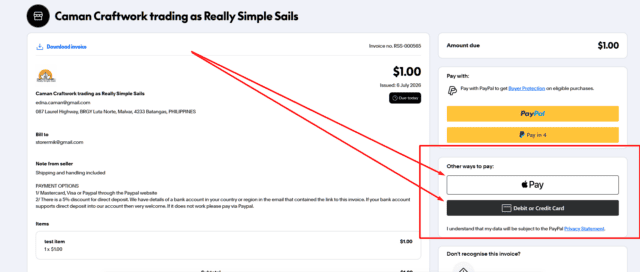
When you do that a new window will open with a fairly normal set of fields asking for your card and other details.
1/ Choose Apple Pay or Debit and Credit Card.
2/ Fill out the other fields. Don’t forget to change the country flag
IMPORTANT check the two boxes at the bottom
3/ Check the box “Delivery Address” – if you card address is not your delivery address it doesn’t matter because we use the details you gave to us on our system.
4/ Check the box “I Confirm that I am of Legal Age etc”
5/ Check details and hit the “PAY” button at the bottom.
NOTE – THIS IS A SCREENSHOT. NOT A PAYMENT INTERFACE
CLICK ON LINK IN PAYPAL LINK IN ADVICE SENT TO YOUR EMAIL.
